 Auto Highlight Words Everywhere
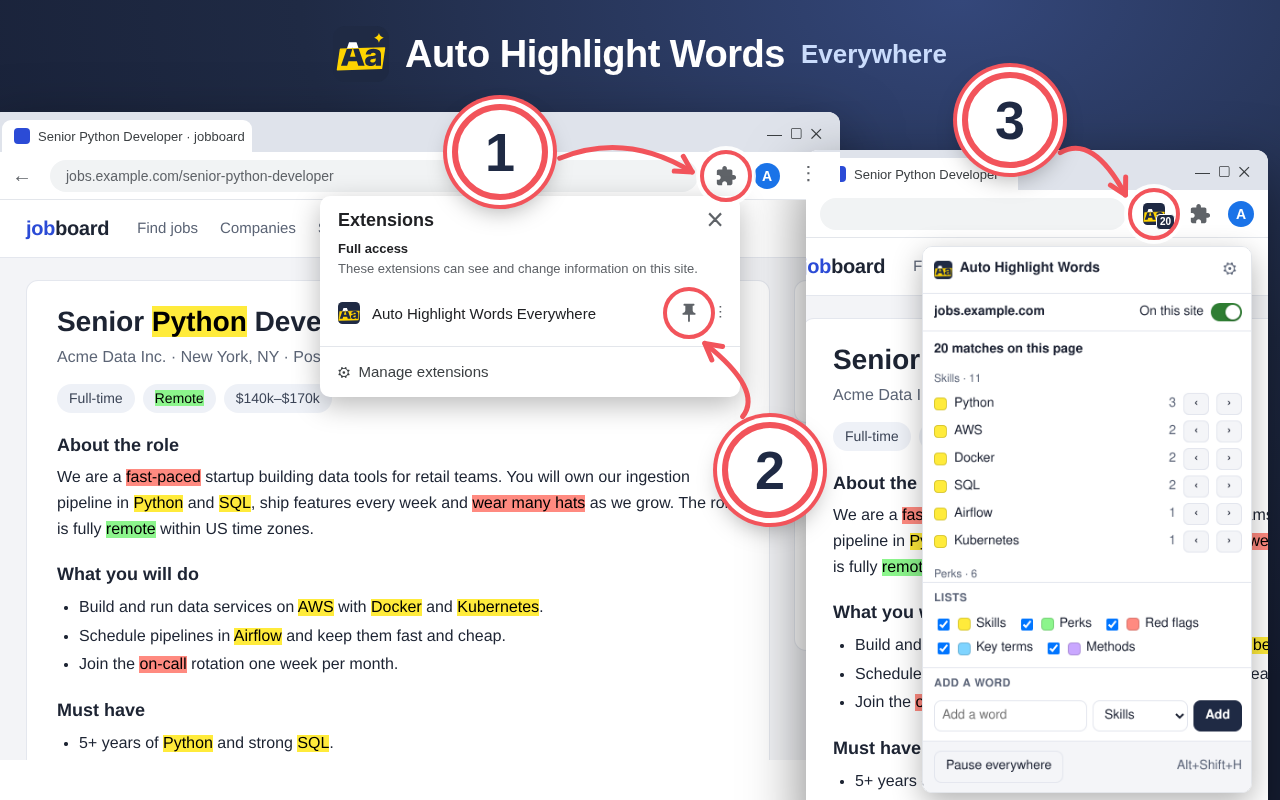
Installed! First, pin the icon.
- Click the puzzle piece at the top right of Chrome.
- Click the pin next to Auto Highlight Words Everywhere.
- Now the icon is always on the toolbar. Its number shows how many of your words are on the page. Click it to jump between them.
Make your first list
Type the words you want to see on every page, separated by commas. Pick a color and save.
Try it here. You can also paste any text into this box.
Senior Python Developer (Remote)
We are hiring a senior Python developer to build data tools for our product team. The role is fully remote within US time zones. You will work with Python, SQL and AWS every day, review code and help junior engineers grow.
Must have: 5+ years of Python, strong SQL, experience with Docker. Nice to have: Kubernetes, Airflow. Salary: $140k–$170k, visa sponsorship is available.
Once you save, your words light up on every website you open, and the icon counts them.
Handy tricks
| Right-click a selected word | Choose Highlight "word" everywhere. The word goes into your last used list. |
| Click the icon, then ‹ › | See how many times each word appears and jump from one match to the next. |
| Alt+Shift+H | Pause highlighting everywhere, press again to turn it back on. |
| On this site switch | Turn highlighting off for one website. Or keep it only on the sites you pick. |
| Several lists, one color each | For example skills in yellow, company names in green, red flags in red. Each list can be on or off. |
| Whole words, match case, regex | Each list has these options in Settings. Whole words are on by default, so “art” will not light up inside “start”. |
| Backup | Export your lists to a file, import them on another computer, or paste a long word list at once. |
Settings: click the icon, then the gear. Your lists sync between your own Chrome profiles if Chrome sync is on.
Something not working? Tell us and we will fix it. · Privacy